ORBITAL — a point-controlled equalizer
Move the point to change the blend of bass body, density, voice, high frequencies and width. You can also reposition the colored points around the circle.
DIRECTION → CONNECTIONS → CHARACTER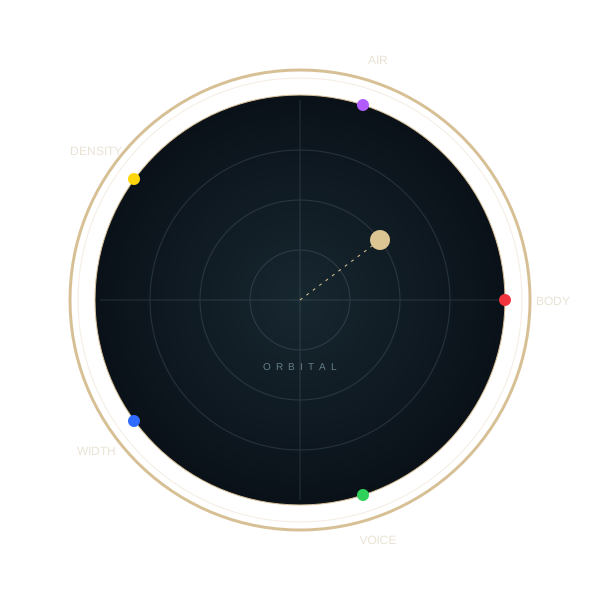
Solid ribbon — positiveOutline — negative
View and individual connections
The white point changes the blend and strength. Colored nodes move around the circle. Arrow keys move the white point; Home returns it to the center. The 3D surface shows the sides' contributions: it is a control map, not a frequency response.
Simple 2D diagram →
The light line highlights one pair. “Affinity” is its connection coefficient in the model; “interaction” changes with the point's direction.
This is a visual control model, not an audio player or photo processor. Values are calculated using ORBITAL formulas. The 3D body is an artistic design for the site; the application's interface is shown in the guide.
SHIKARDOS ORBITAL · A stream of strength
FLOW. See how character takes shape.
Move the point. Five colored flows immediately show how the setting changes. Select a side to inspect its inflow, effective contribution and depth.
- Input
- —
- Passage
- —
- Contribution
- —
Drag colored points along the circle. Drag the light point within it.
Direction → characterPressure H —
Inflow → effective contribution.
Related parameters will appear here.
Inflow. What each side would take if it were alone on the circle. Total inflow adds the absolute values.
Passage. The common distribution multiplier. Lines narrow from inflow to effective contribution; the hatched part shows the difference.
Contribution. The actual result for a side. A negative sign is shown as a hollow flow. These percentages do not have to add up to 100.
A control model based on ORBITAL formulas. Each side's depth changes separately. The light movement is illustrative, not a measurement of music. Settings remain within this demonstration.
How to use the Orbit →Yuri's keyboard.
Seven and five.
At the back are seven long keys, from dark to light. In front are five colored keys, in the sharp-note positions. One keyboard, two clear rows.
Select a key. Left/right arrows move through all twelve; Home and End select the first and last.
Optional quiet notes in the middle octave. Sound is currently off.
COLORED KEY · C♯
BODY
Body
The low-frequency foundation of sound. BODY boosts or cuts the area around 100 Hz, one component of the sound's body.
Musical key: C♯ · C♯4 · 277.18 Hz.
Band gain, not note pitch. The point's position simultaneously affects other sides of the Orbit.
Coefficients of the shared model. These describe relationships between dimensions, not musical intervals.
Yuri's original diagram combines seven steps of light and five colored ORBITAL sides. You can listen to the notes separately: their pitches do not set the equalizer frequencies. For example, C♯ sounds at 277.18 Hz, while BODY controls the area around 100 Hz.
How to read the keyboard
Long keys: C, D, E, F, G, A, B — a continuous transition from black to white. Short keys: C♯ red, D♯ yellow, F♯ green, G♯ blue, A♯ violet. There is no short key between E and F or after B.
- Red · C♯ · BODY
- Body: boost or cut around 100 Hz.
- Yellow · D♯ · DENSITY
- Density: two connected areas at 250 and 630 Hz.
- Green · F♯ · VOICE
- Voice: the area around 3 kHz, without separating vocals from other sounds.
- Blue · G♯ · WIDTH
- Stereo width: a spatial parameter, not a frequency band.
- Violet · A♯ · AIR
- Air: a high shelf from 6 kHz.
- GRAVITY and CRYSTAL
- Separate sound tools. They neither replace the outer gray keys nor add sides to the Orbit. Lira explains GRAVITY and CRYSTAL →
Character comes
from the combination.
The sound Orbit has five sides. The initial arrangement appears on opening. You can reposition colored poles around the circle. Moving toward one side changes the contributions of the others at the same time: some increase, others decrease. These are connected changes, not five shares that must add up to 100%.
chooses the combination
Distance
sets the strength
Closer to the center,
finer adjustments.
Strength rises nonlinearly: near the center, it is easy to find subtle changes; near the edge, the character becomes pronounced. Connections between sides limit their combined pressure.
Returning the point to the center resets these sides' contributions to zero. Other independent processing in the player remains under its own controls.
Images have
their own six sides.
Brightness, contrast, saturation, hue, warmth and gamma. The image Studio uses the same point principle but its own connections and scales. Switch the set at the top and compare the movement.
Color helps distinguish the sides. It does not imply a physical correspondence between light and sound frequencies.